Inspect the tile before you build the material
Seamless texture checker
See edge seams and obvious repetition before adding a texture to Blender or Unreal. Your image stays in this browser.
Choose a texture
Local preview only. This tool does not upload, modify or repair the source image. Preview is limited to 8192 px per side.
Example pattern loaded. Choose your own texture to inspect its edges.
Tile preview
Illustrative pattern · 256 × 256 px
Cyan guides mark boundaries. Turn them off to judge the actual image. The preview preserves the image aspect ratio; the bottom row may be cropped.
How to check whether a texture is seamless
- Load the color map. Start with the albedo or base color, not a rendered material sphere. A sphere preview has lighting and distortion that hide the tile edges.
- Repeat it three or four times. Look for bright bands, dark borders, cut-off bricks and repeated stains. Switch off the guides so they do not hide a fine seam.
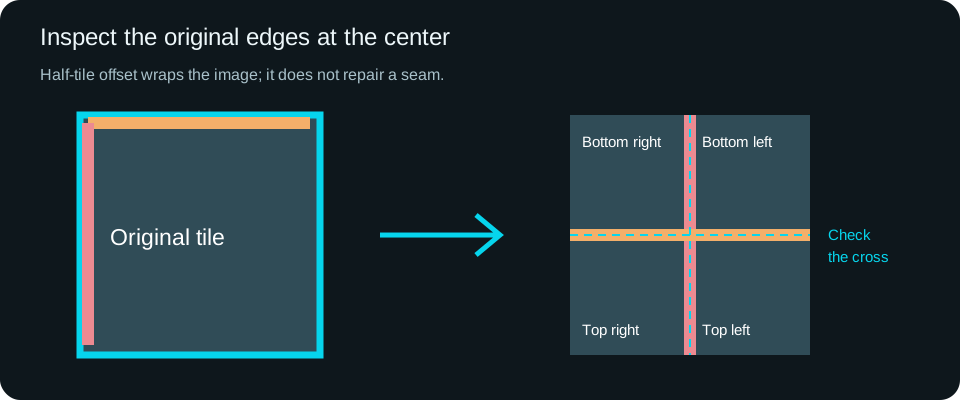
- Use half-tile offset. The left and right edges meet at the vertical middle of each tile; the top and bottom edges meet at the horizontal middle. The original edge discontinuities become easier to inspect away from the border.
- Check every map. A seamless color map can still have an inconsistent normal or roughness map. Use the same UVs, rotation and repeat count for the whole material.
Seamless edges and convincing repetition are different checks
A tile may join perfectly but still reveal an obvious repeating knot or a single bright stone. Increase the grid size to inspect that larger pattern. For a large wall, consider blending compatible materials or varying the placement in your renderer. This checker is a visual inspection tool; it does not assign a quality score or infer a physical scale.
What half-tile offset changes
Offset mode shifts the displayed image by half its width and height, wrapping the pixels at the edges. It changes the preview coordinates, not the file. No blending or generative fill is applied. A visible cross in the center usually points to an edge mismatch; natural lines in the material may also cross there, so compare with the repeated grid.
Take the checked texture into your scene
Use a texel density and memory budget to choose a repeat scale. Follow the Blender PBR node setup or the seamless texture workflow. Try materials from wood, concrete and tiles.
Does my image leave this browser?
The file picker reads the selected image into browser memory. The checker makes no image upload request. Existing site analytics may record that a tool was used, but do not receive the file, pixels or filename. The saved PNG contains only the displayed preview and any guides you enabled.